
CYBERAWARE LMS - WHITE-LABEL CYBER SECURITY AWARENESS & PHISHING SIMULATION LMS
--------------------------------------------------------------------------------
1. PRODUCT OVERVIEW & MARKETPLACE SALES PITCH
2. KEY VALUE PROPOSITIONS & HIGHLIGHTS
3. DETAILED FEATURE BREAKDOWN
- 3.1 Realistic Phishing & Social Engineering Simulator
- 3.2 Interactive Learner Experience & Gamification
- 3.3 Verifiable PDF Certificates with Live QR Code Verification
- 3.4 Scam of the Month Advisory CMS
- 3.5 Enterprise Admin Panel & Analytics Dashboard
- 3.6 Multi-Factor Authentication (MFA) & WebAuthn / Passkeys
- 3.7 Transactional Email Engine & Template Manager
- 3.8 100% White-Label & Instant Branding Customizer
4. PRE-LOADED TRAINING MODULES & SCENARIOS (128 Interactive Scenarios)
5. PROGRAMMING LANGUAGES & ARCHITECTURE
6. FULL TECHNOLOGY STACK & LIBRARIES
7. SYSTEM REQUIREMENTS & PHP EXTENSIONS
8. STEP-BY-STEP DEPLOYMENT GUIDES
- 8.1 Method 1: cPanel / Traditional Shared Hosting (Recommended for Non-Techs)
- 8.2 Method 2: aaPanel / CyberPanel / DirectAdmin
- 8.3 Method 3: Cloud VPS (Ubuntu 22.04 / 24.04 with Nginx + PHP 8.2+)
- 8.4 Method 4: Localhost (XAMPP / Laragon / PHP Artisan Serve)
9. DEFAULT DEMO CREDENTIALS
10. HOW TO REBRAND & CUSTOMIZE IN UNDER 5 MINUTES
11. COMMERCIAL MONETIZATION & BUSINESS USE CASES
12. SUPPORT, UPDATES & LICENSE INFORMATION
--------------------------------------------------------------------------------
================================================================================
1. PRODUCT OVERVIEW
================================================================================
"CyberAware LMS - Phishing Simulation & Cyber Security Awareness Training Platform (White-Label Laravel LMS)"
Cyber threats and social engineering cause over 90% of data breaches worldwide. Traditional compliance training consists of boring 50-slide PowerPoints that employees immediately forget.
CyberAware LMS revolutionizes cyber security training by delivering hyper-realistic, sandboxed phishing simulations, SMS smishing lures, executive BEC (Business Email Compromise) drills, and instant feedback.
Built on the ultra-robust Laravel 12 framework with Tailwind CSS v4, Alpine.js, and Chart.js, CyberAware LMS is completely white-label and demo-ready. Anyone purchasing this software can launch their own cybersecurity training business, sell awareness packages to corporate clients, or train their internal team in under 10 minutes.
Why Buyers Love This Product:
• 100% White-Label: No external vendor locks, no recurring license fees. You own the code.
• Pre-loaded Content: Comes with 17 training categories, 9 comprehensive modules, and 128 production-ready scenario drills.
• Plug & Play: Zero-configuration SQLite setup for instant local/shared hosting preview, plus a complete MySQL 5.7+/8.0+ database schema.
• Vendor Included: Fully packaged with pre-compiled assets and PHP vendor libraries—no `composer install` or `npm run build` required on your server!
• Enterprise Security: WebAuthn / FIDO2 Passkeys, TOTP Authenticator (Google Authenticator/1Password), and role-based permissions.
• Automated Certificates: Generates branded PDF certificates with live tamper-proof QR code verification.
================================================================================
2. KEY VALUE PROPOSITIONS & HIGHLIGHTS
================================================================================
✓ Realistic Simulation Engine: Simulates actual email clients (Gmail, Outlook, Apple Mail), mobile SMS apps, browser login gateways, and banking apps.
✓ Sandboxed Educational Architecture: Completely safe. No real passwords or sensitive user data are ever captured or stored.
✓ Automated PDF Certificate Generation: Automatically awards landscape A4 certificates of completion with dynamic learner name, score, and tamper-proof verification QR code.
✓ Public Certificate Verification Portal: Anyone scanning the QR code or visiting `/verify/{certificate_id}` can verify the authentic issuer, recipient, and award date.
✓ Dual Security MFA: Supports both TOTP Authenticator apps and hardware WebAuthn / Passkeys (FaceID, TouchID, YubiKey).
✓ Scam of the Month Blog/CMS: Publish monthly threat advisories linked directly to training quizzes with rich Markdown formatting.
✓ Interactive Leaderboard & Analytics: Track departmental compliance, time taken per question, phishing accuracy vs. legitimate accuracy.
✓ Built-in SMTP Manager & Tester: Configure SMTP directly from the Admin UI and test deliverability with a live email test button.
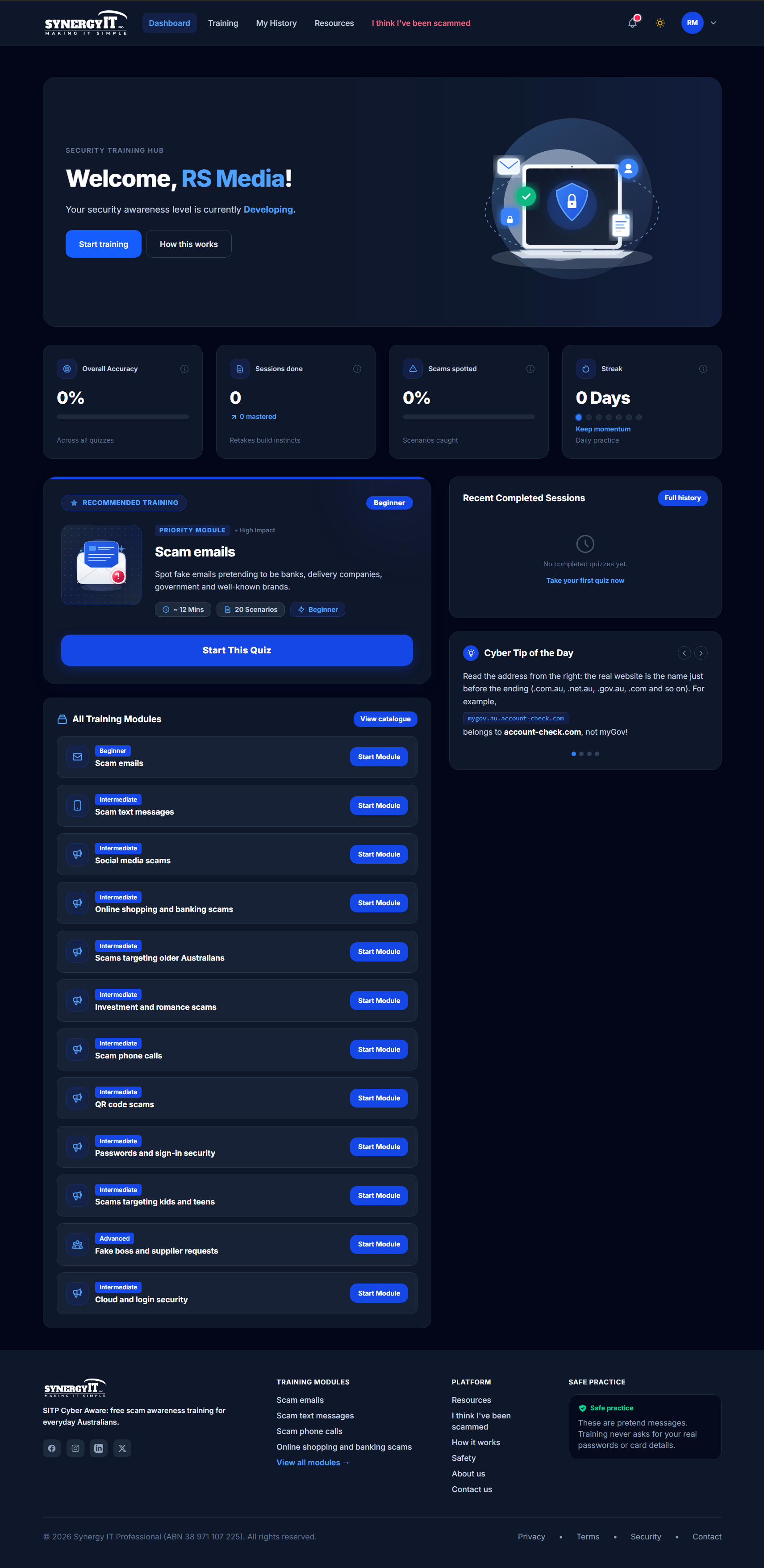
✓ Modern Responsive Design: Dark Mode / Light Mode toggle with smooth Tailwind CSS styling. Looks stunning on smartphones, tablets, and 4K displays.
================================================================================
3. DETAILED FEATURE BREAKDOWN
================================================================================
3.1 REALISTIC PHISHING & SOCIAL ENGINEERING SIMULATOR
------------------------------------------------------
• Multi-Channel Threat Types:
- Email Phishing & Spoofed Headers (Lookalike domains, display name spoofing, urgent invoice lures)
- SMS Smishing (Package delivery alerts, toll fee payment traps, urgent 2FA codes)
- Executive Fraud / BEC (CEO urgent wire transfer requests, secret gift card demands)
- Fake SaaS & Cloud Portals (Microsoft 365 login traps, Google Workspace docs, Zoom syncs, Slack mentions)
- Telephone & Vishing Scripts (Imposter bank fraud department phone calls)
- Shopping & Marketplace Scams (Fake retail checkout gates, crypto recovery scams)
• Interactive URL Inspection Tool:
- Learners can hover over or inspect suspicious links to reveal hidden redirect domains before making a decision.
• Educational Feedback:
- Instant explanation upon answering, showing specific red flags (domain hierarchy tricks, artificial urgency, payment anomalies).
3.2 INTERACTIVE LEARNER EXPERIENCE & GAMIFICATION
-------------------------------------------------
• Clean User Dashboard: Shows completed quizzes, overall accuracy percentage, active streaks, and earned certificates.
• Personalized Training: Scenarios dynamically display the learner's own name and email address for terrifyingly realistic immersion!
• Guest Preview Mode: Allows prospective customers or team members to take a quick 7-question demo without creating an account.
• Progress Retention: Automatic saving of quiz progress, resume-on-next-visit, and attempt history tracking.
• Review Mode: Learners can review previous quiz attempts to study explanations and warning signs.
3.3 VERIFIABLE PDF CERTIFICATES WITH LIVE QR CODE VERIFICATION
--------------------------------------------------------------
• High-Resolution Landscape PDF: Rendered using DomPDF with custom background templates for both Full Track and Individual Module completions.
• Dynamic QR Code Generation: Encodes a direct verification URL powered by Endroid QR Code.
• Public Verification Portal (`/verify/{certificate_id}`):
- Validates certificate authenticity
- Displays recipient name, module title, score, and issuance timestamp
- Protects against forged or altered credentials
• Automated Email Delivery: Optionally emails the certificate directly to the learner upon passing the threshold score (default: 80%).
3.4 SCAM OF THE MONTH ADVISORY CMS
----------------------------------
• Threat Advisory Publishing: Admin can publish recurring educational articles highlighting active real-world scams (e.g. Australia Post parcel lures, Linkt toll road scams, AI voice cloning).
• Deep Linking to Quizzes: Attach any published quiz directly to a Scam of the Month article with an interactive "Practice this Scam" button.
• Markdown & SEO Optimized: Supports full Markdown, structured heading tags, and clean slugs.
3.5 ENTERPRISE ADMIN PANEL & ANALYTICS DASHBOARD
------------------------------------------------
• Executive KPI Overview:
- Total registered learners, active quizzes, completion rates, and system accuracy rate.
- Phishing susceptibility index: instantly see how vulnerable your organization is to clicking bad links.
• User & Learner Management:
- View all learners, search, filter by role, activate/deactivate accounts, inspect individual quiz attempt breakdowns.
• Quiz & Question Builder:
- Create and edit quizzes with custom categories, difficulty ratings (Beginner, Intermediate, Advanced), and estimated duration.
- Add scenario questions with customizable sender name, sender address, subject line, message body, safe URL, hover URL, explanation, and bullet-point warning signs.
• Audit Logs:
- Comprehensive activity logs tracking logins, quiz completions, admin settings changes, and security events with IP and User-Agent capture.
3.6 MULTI-FACTOR AUTHENTICATION (MFA) & WEBAUTHN PASSKEYS
---------------------------------------------------------
• FIDO2 / WebAuthn Support: Login securely using hardware security keys (YubiKey), Apple TouchID/FaceID, or Windows Hello.
• TOTP Mobile Authenticator: QR code setup compatible with Google Authenticator, Microsoft Authenticator, 1Password, Authy.
• Emergency Recovery Codes: Generates 8 one-time backup recovery codes for account recovery.
3.7 TRANSACTIONAL EMAIL ENGINE & TEMPLATE MANAGER
-------------------------------------------------
• SMTP Configuration from Web UI: No need to touch `.env` to configure mail—admins can enter SMTP credentials directly in the admin panel.
• Live SMTP Test Diagnostic: Send instant test emails from the UI to verify configuration before dispatching to learners.
• Custom Broadcast Tool: Send personalized announcement emails to specific learners or all team members directly from the Admin Panel.
• Built-in Bounded Retries: Robust handling of transient SMTP delays with fallback error notifications.
3.8 100% WHITE-LABEL & INSTANT BRANDING CUSTOMIZER
--------------------------------------------------
• Customizable Business & Legal Info:
- Update Organization / Entity Name, ABN / Registration Number, Phone, Email, and Physical Office Address from the Admin UI.
• Customizable Logos:
- Place your custom logo files in `public/images/` and the application adopts your brand identity instantly.
• Dynamic Copyright & Footer:
- Footer copyright text, legal disclaimer, and security policy automatically sync with your admin settings.
================================================================================
4. PRE-LOADED TRAINING MODULES & SCENARIOS (128 Scenarios)
================================================================================
The package arrives pre-loaded with 17 categories, 9 active quizzes, and 128 scenario questions:
1. Email Defence & Everyday Phishing Fundamentals (10 Scenarios)
- Fake IT password reset notifications
- Urgent vendor invoice changes
- Fake cloud storage link sharing
- Delivery failure notifications
2. Mobile Smishing & Everyday SMS Scam Defence (10 Scenarios)
- Toll road unpaid toll text scams
- Bank fraud verification SMS
- Fake courier parcel address confirmation
- Voicemail audio link lures
3. Executive Fraud & Workplace Defence (10 Scenarios)
- CEO confidential wire transfer request (BEC)
- Urgent payroll bank account change request
- Gift card emergency purchase lure
- False board member urgent request
4. Social Media Scams & Impersonation Defence (10 Scenarios)
- Copyright infringement DM threatening account deletion
- Fake influencer sponsorship offer
- Imposter LinkedIn recruiter message
- Cryptocurrency giveaway lure
5. Cloud Identity & SaaS Workplace Security (10 Scenarios)
- Imposter Microsoft 365 consent phishing app
- Fake Google Drive shared financial sheet
- Zoom recording download link trick
- Deceptive Slack mention notification
6. Protecting Older Australians & Everyday Citizens (15 Scenarios)
- "Hi Mum/Dad, my phone broke" WhatsApp & SMS impersonation
- Government tax refund / rebate trap
- Imposter utility bill overdue threat
- Remote desktop support refund scam (TeamViewer/AnyDesk)
7. Investment and Romance Scams (15 Scenarios)
- High-yield cryptocurrency investment platform
- Imposter government bond prospectus
- Long-distance online dating financial emergency
- Fake crypto recovery specialist lure
8. Scam Phone Calls & Vishing Defence (15 Scenarios)
- Bank fraud prevention department spoofed caller ID
- Telecommunications provider SIM-swap warning
- Government department arrest warrant intimidation
- Computer repair virus alert call
9. Online Shopping and Banking Scams (15 Scenarios)
- Fake discount luxury retail web store
- Imposter marketplace buyer sending fake payment receipts
- Urgent banking session expired re-authentication
- Bogus escrow payment service
================================================================================
5. PROGRAMMING LANGUAGES & ARCHITECTURE
================================================================================
• PHP (Version 8.2 or 8.3 recommended, compatible with PHP 8.4)
- Clean MVC (Model-View-Controller) architecture based on Laravel 12.
- Strongly typed models, form requests, service classes, and policy-based authorization.
• SQL (MySQL 5.7+, MySQL 8.0+, MariaDB 10.3+, or SQLite 3.35+)
- Fully indexed relational database schema with foreign keys and cascade rules.
• JavaScript (Modern ES6+ / Alpine.js)
- Reactive client-side interactivity without the bloat or complexity of heavy single-page apps.
• HTML5 & Blade Templating Engine
- Semantic, accessible markup with dynamic component layouts.
• CSS3 & Tailwind CSS v4
- Utility-first responsive CSS, pre-compiled via Vite with built-in Dark Mode.
================================================================================
6. FULL TECHNOLOGY STACK & LIBRARIES
================================================================================
Backend Framework:
• Laravel Framework 12.x (PHP's most popular, secure, and actively supported framework)
• Laravel Sanctum & Session-based authentication
• Laravel WebAuthn (FIDO2 authentication by asbiin)
• DomPDF (Fast server-side PDF certificate compilation)
• Endroid QR Code (High-resolution vector/PNG QR code rendering)
• Intervention Image (Avatar & image upload processing)
Frontend & UI:
• Tailwind CSS v4 (Modern, highly performant CSS framework)
• Alpine.js (Lightweight reactive state management)
• Chart.js (Interactive analytics graphs & score charts)
• Lucide Icons & Heroicons (Clean, professional SVG icons)
• Vite (Modern frontend asset compilation tool)
Database & Storage:
• SQLite (Included as zero-config default)
• MySQL / MariaDB (Full production dump provided in `database.sql`)
• Local filesystem or S3-compatible cloud storage for file uploads
================================================================================
7. SYSTEM REQUIREMENTS & PHP EXTENSIONS
================================================================================
Server Requirements:
• Web Server: Apache (with `mod_rewrite` enabled) or Nginx
• PHP Version: 8.2 or 8.3+
• Database: MySQL 5.7+ / 8.0+ / MariaDB 10.3+ OR SQLite 3.35+
• HTTPS / SSL Certificate (Required for WebAuthn passkeys and recommended for production)
Required PHP Extensions:
• `pdo` and `pdo_mysql` (or `pdo_sqlite`)
• `openssl`
• `mbstring`
• `tokenizer`
• `xml`
• `ctype`
• `json`
• `bcmath`
• `gd` or `imagick` (for QR codes and image processing)
• `fileinfo`
• `curl`
================================================================================
8. STEP-BY-STEP DEPLOYMENT GUIDES
================================================================================
--------------------------------------------------------------------------------
8.1 METHOD 1: cPANEL / TRADITIONAL SHARED HOSTING (EASIEST)
--------------------------------------------------------------------------------
1. Upload the ZIP File:
- Log in to your cPanel.
- Go to "File Manager".
- Upload `CyberAware-LMS-WhiteLabel-v1.0.zip` to your domain folder (e.g., `public_html` or a subdomain folder like `cyber.yourdomain.com`).
- Extract the ZIP archive.
2. Set Document Root to `public`:
- In cPanel, go to "Domains" or "Subdomains".
- Ensure the Document Root points to the `public` subfolder (e.g. `public_html/public` or `cyber.yourdomain.com/public`).
- *Note: If your hosting provider does not allow changing Document Root, the provided root `.htaccess` will automatically redirect requests to `/public` seamlessly.*
3. Create MySQL Database (Optional if using SQLite):
- Go to cPanel -> "MySQL Databases".
- Create a new database (e.g. `cpaneluser_cyberaware`).
- Create a new user with a strong password, and assign all privileges to the database.
- Open "phpMyAdmin", select your new database, click "Import", choose `database.sql` from your extracted files, and click "Go".
4. Configure `.env`:
- In File Manager (make sure "Show Hidden Files" is checked), open `.env`.
- Update your site URL:
`APP_URL=https://yourdomain.com`
`APP_ENV=production`
`APP_DEBUG=false`
- If using MySQL, set:
`DB_CONNECTION=mysql`
`DB_HOST=127.0.0.1`
`DB_PORT=3306`
`DB_DATABASE=cpaneluser_cyberaware`
`DB_USERNAME=cpaneluser_dbuser`
`DB_PASSWORD=your_database_password`
- If using SQLite (Zero-config!):
`DB_CONNECTION=sqlite`
`DB_DATABASE=database/database.sqlite`
- Save the file.
5. File Permissions:
- Ensure the `storage` and `bootstrap/cache` folders are writable (Permissions: `775` or `755`).
- Visit your website in your browser! Log in at `/login` with the default admin credentials.
--------------------------------------------------------------------------------
8.2 METHOD 2: aaPANEL / CYBERPANEL / DIRECTADMIN
--------------------------------------------------------------------------------
1. Create a Website:
- In aaPanel, go to "Website" -> "Add Site".
- Enter your domain name. Select PHP 8.2 or 8.3.
2. Upload & Extract:
- Upload the ZIP file to the site's root directory and extract it.
3. Configure Site Directory:
- Click site "Settings" -> "Site directory".
- Set "Running directory" to `/public` and click Save.
4. Set URL Rewrite:
- In site Settings, click "URL rewrite", select "laravel5", and save.
5. Setup Database:
- Import `database.sql` into your database via aaPanel phpMyAdmin.
- Update `.env` with your database credentials.
6. Fix Permissions:
- Set owner to `www:www` and permissions `755` for `storage` and `bootstrap/cache`.
--------------------------------------------------------------------------------
8.3 METHOD 3: CLOUD VPS (UBUNTU 22.04 / 24.04 WITH NGINX + PHP-FPM)
--------------------------------------------------------------------------------
1. Unzip project in `/var/www/cyberaware`:
```bash
sudo mkdir -p /var/www/cyberaware
sudo unzip CyberAware-LMS-WhiteLabel-v1.0.zip -d /var/www/cyberaware
cd /var/www/cyberaware
```
2. Set Permissions:
```bash
sudo chown -R www-data:www-data /var/www/cyberaware
sudo chmod -R 775 /var/www/cyberaware/storage /var/www/cyberaware/bootstrap/cache
```
3. Import Database:
```bash
mysql -u root -p -e "CREATE DATABASE cyberaware_lms CHARACTER SET utf8mb4 COLLATE utf8mb4_unicode_ci;"
mysql -u root -p cyberaware_lms < database.sql
```
4. Configure `.env`:
- Edit `/var/www/cyberaware/.env` with your actual domain URL and MySQL password.
5. Nginx Server Block Configuration (`/etc/nginx/sites-available/cyberaware.conf`):
```nginx
server {
listen 80;
server_name yourdomain.com;
root /var/www/cyberaware/public;
add_header X-Frame-Options "SAMEORIGIN";
add_header X-Content-Type-Options "nosniff";
index index.php;
charset utf-8;
location / {
try_files $uri $uri/ /index.php?$query_string;
}
location = /favicon.ico { access_log off; log_not_found off; }
location = /robots.txt { access_log off; log_not_found off; }
error_page 404 /index.php;
location ~ \.php$ {
fastcgi_pass unix:/var/run/php/php8.2-fpm.sock;
fastcgi_param SCRIPT_FILENAME $realpath_root$fastcgi_script_name;
include fastcgi_params;
}
location ~ /\.(?!well-known).* {
deny all;
}
}
```
Enable site and reload Nginx:
```bash
sudo ln -s /etc/nginx/sites-available/cyberaware.conf /etc/nginx/sites-enabled/
sudo nginx -t && sudo systemctl reload nginx
sudo certbot --nginx -d yourdomain.com
```
--------------------------------------------------------------------------------
8.4 METHOD 4: LOCAL DEVELOPMENT (XAMPP / LARAGON / PHP ARTISAN SERVE)
--------------------------------------------------------------------------------
1. Extract the ZIP folder anywhere on your computer.
2. Open your terminal in the extracted directory.
3. Start the built-in development server:
```bash
php artisan serve
```
4. Open `http://127.0.0.1:8000` in your web browser. That's it!
The project comes pre-configured with SQLite and clean demo data out of the box.
================================================================================
9. DEFAULT DEMO CREDENTIALS
================================================================================
Administrator Account (Full Access):
• Email: admin@example.com
• Password: Password123!
• Role: Admin (Access to `/admin` dashboard, quiz builder, SMTP manager, settings)
Standard Demo Learner Account:
• Email: user@example.com
• Password: Password123!
• Role: Learner (Access to quiz modules, dashboard, certificates)
Additional Team Learner Accounts (For Analytics & Leaderboard Demo):
• sarah@example.com / Password123!
• david@example.com / Password123!
• emily@example.com / Password123!
• michael@example.com / Password123!
================================================================================
10. HOW TO REBRAND & CUSTOMIZE IN UNDER 5 MINUTES
================================================================================
Everything is designed for instant white-labeling:
Step 1: Log in as Administrator
Navigate to `http://yourdomain.com/login` and sign in with `admin@example.com`.
Step 2: Update Business & Legal Settings
• Go to: `/admin/settings/business` (Or click Admin -> Settings -> Business Info)
• Enter your company or client's:
- Official Trading Name (e.g. "Acme Cyber Security")
- Business Phone Number (e.g. "+1 (555) 019-2834")
- Public Business Email (e.g. "support@acmecyber.com")
- Physical Office Address
- Business Registration / Tax Number (ABN, EIN, VAT, etc.)
• Click "Save Changes". The entire website footer, legal notices, contact page, and privacy policies update automatically!
Step 3: Update SMTP & Email Settings
• Go to: `/admin/settings/mail`
• Select your mail driver (SMTP, Sendmail, Log).
• Enter your SMTP host, port, username, and password.
• Set "From Address" and "From Name".
• Click "Send Test Email" to verify delivery in real time!
Step 4: Update Logos & Branding Images
• Replace `public/images/logo.png` (Light mode logo)
• Replace `public/images/logo-dark.png` (Dark mode logo)
• Replace `public/images/favicon.png` (Browser favicon)
• Replace certificate backgrounds in `public/images/certificates/` if you wish to customize certificate artwork.
================================================================================
11. COMMERCIAL MONETIZATION & BUSINESS USE CASES
================================================================================
Here are proven ways you or your clients can generate revenue with CyberAware LMS:
1. Sell B2B Corporate Cyber Training Subscriptions:
Charge small and medium businesses $49 - $299/month to train their staff and provide compliance certificates for business cyber insurance requirements.
2. Launch a Niche Cybersecurity EdTech SaaS:
Offer on-demand phishing awareness courses to freelancers, remote workers, real estate agents, schools, or accounting firms.
3. Sell Custom White-Label Portals to Managed Service Providers (MSPs):
IT service providers and MSPs constantly need security training solutions to resell to their client base. Rebrand this portal and sell it as a value-added service.
4. Client Deliverable for Freelancers & Digital Agencies:
Charge $2,500 - $5,000 to deliver a turnkey, fully branded cyber security awareness academy for corporate clients.
================================================================================
12. SUPPORT, UPDATES & LICENSE INFORMATION
================================================================================
• Clean Code Guarantee: Strict PSR-12 coding standard, modular service architecture, and zero obfuscation.
• Database Cleanliness: All 19 database tables are structured, indexed, and sanitized with zero proprietary client secrets.
• Security Standards: Follows OWASP recommendations, CSRF token validation, input sanitization, secure password hashing, and RFC 9116 security disclosure policies.
Enjoy your new CyberAware LMS platform!
Custom / Standalone
v1.0.0
46.67 MB
30 Days Included
Server Requirements: • Web Server: Apache (with `mod_rewrite` enabled) or Nginx • PHP Version: 8.2 or 8.3+ • Database: MySQL 5.7+ / 8.0+ / MariaDB 10.3+ OR SQLite 3.35+ • HTTPS / SSL Certificate (Required for WebAuthn passkeys and recommended for production) Required PHP Extensions: • `pdo` and `pdo_mysql` (or `pdo_sqlite`) • `openssl` • `mbstring` • `tokenizer` • `xml` • `ctype` • `json` • `bcmath` • `gd` or `imagick` (for QR codes and image processing) • `fileinfo` • `curl`
No reviews yet for this product.
Sngine Vault License Terms
Welcome to Sngine Vault! These License Terms explain the rights and restrictions for digital items sold on our marketplace. By purchasing or selling on Sngine Vault, you agree to comply with the applicable terms listed below.
General Overview
Each product comes with either a Regular License or an Extended License. Licenses are non-exclusive, non-transferable, and apply to a single end product unless otherwise stated.
Software & Code
Grants use in one end product for yourself or a client that is not sold or monetised.
- Modify or customize the item.
- Use in personal or client projects.
- No resale or redistribution.
Allows use in one end product that is sold or monetized.
- Use in SaaS platforms, web apps, or software sold to end users.
- Unlimited users/customers for the single end product.
- Cannot resell or redistribute the source files.
Fonts
- Use in unlimited personal and commercial projects.
- Use in logos, print materials, social media graphics, and websites.
- Cannot embed in apps, eBooks, or web apps.
- Use in desktop software, mobile apps, games, and eBooks.
- Embed fonts in web or app UI for commercial products.
- Distribute fonts as part of a larger digital product (not standalone).
Audio
- Use in one end product (e.g., video, podcast, game).
- Can be used on YouTube, social media, or websites without monetization.
- No broadcast rights or resale usage.
- Use in TV, radio, streaming platforms, and commercials.
- Monetized use allowed (e.g., ads, paid courses, mobile games).
- Redistribution as part of a larger work is permitted.
Video
- Use in one project for personal or client use.
- Includes usage in YouTube videos, presentations, and websites.
- Not allowed in commercial templates or resale products.
- Use in monetized or commercial projects (e.g., ads, films).
- Incorporate into templates or end products for sale.
- Distribution to unlimited viewers/customers is allowed.
Images, Icons, Graphics
- Use in websites, blogs, social media, and client work.
- Can be modified and used in static designs.
- Not for use in templates, merchandise, or resold materials.
- Use in print-on-demand, merchandise, and commercial templates.
- Use in up to 250,000 physical or digital end products.
- Must not resell the original image as-is.
Common Terms for All Licenses
- No Ownership: You may not claim ownership of any item, even after modifications.
- No Redistribution: You cannot share, resell, or sublicense items in their original or modified form.
- Single Use: A license applies to a single end product. For multiple projects, purchase additional licenses.
- Team Use: Items may only be shared within your team or organization, not externally.
- Attribution: May be required if the author specifies it in the item description.
For Sellers
- • You must specify which license types apply to your item.
- • You confirm you own or have rights to sell every asset included in your product.
- • You agree to provide reasonable clarification of license usage if asked by buyers.
License Violations
Violations of these terms may result in:
- • Account suspension or permanent ban.
- • Loss of access to purchased items.
- • Legal action from Sngine Vault or the original creator.
Need Help?
If you are unsure which license you need or want to report a violation, contact us: