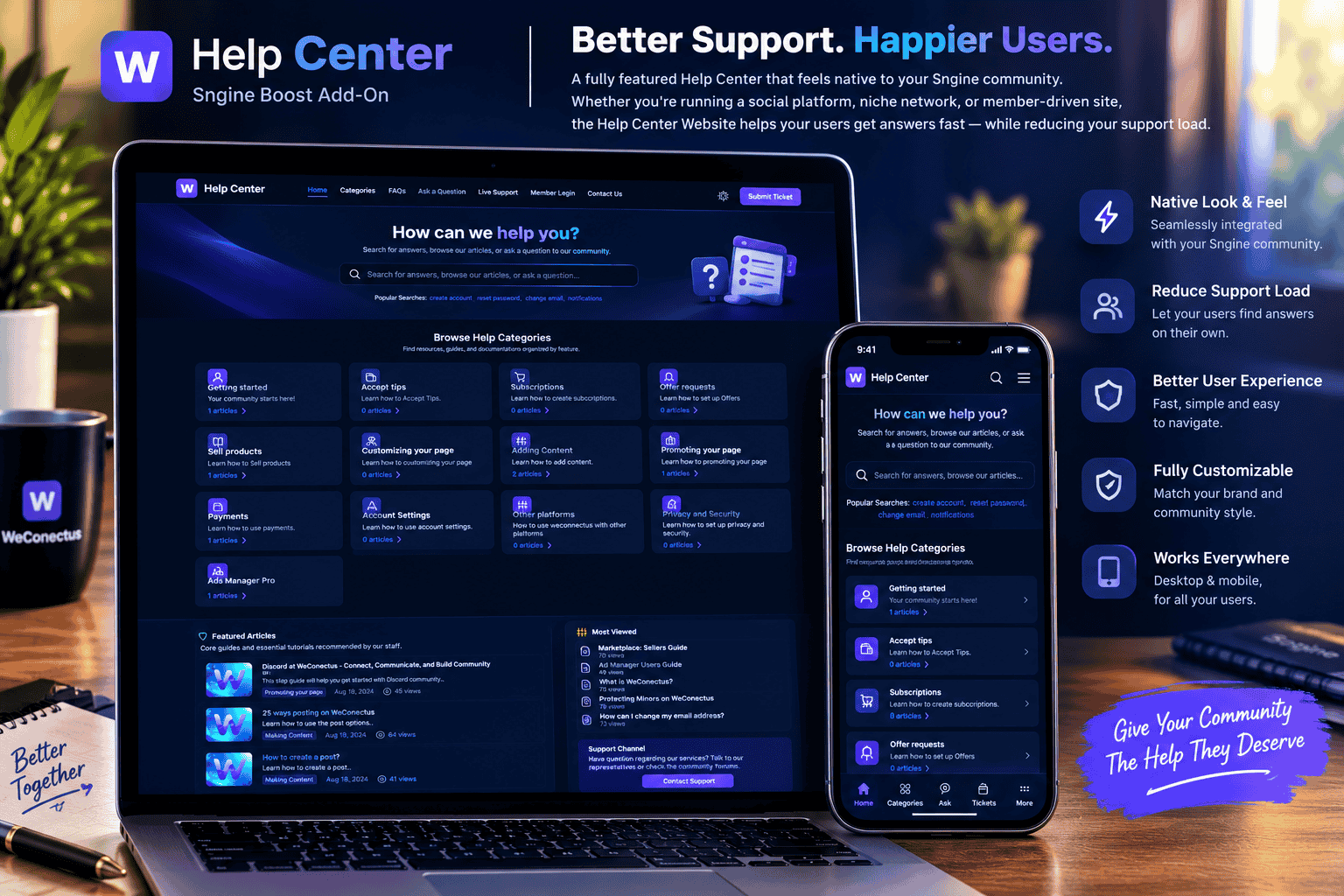

Help Center & Knowledge Base Script - Commercial Edition — Version 2.0
A complete, high-performance, and modern Help Center, Knowledge Base, and Community Ticketing Platform custom-built in **PHP (PDO) + MySQL**. Designed as a ready-to-sell standalone web script with an **automated Web Installer** (no manual SQL import required) and a built-in **License Activation System** powered by [SngineVault License Server](https://licence.snginevault.com/).
---
## 🌟 Key Features
### 💻 Client Portal (Frontend)
* **Live AJAX Search Bar**: Instant real-time keyword suggestions with highlighting across article titles, content excerpts, tags, and FAQs.
* **Category Collections**: Responsive grid cards with icons, article counts, and descriptions.
* **Knowledge Base Articles**: Rich article views with dynamic breadcrumbs, author profile metadata, reading duration, table of contents, related guides, and helpfulness voting (Yes/No).
* **Dynamic FAQ Accordion**: Instant category filtering, collapsible questions, and deep-linking support.
* **Community Ticketing System (`/ask`)**: Users can submit questions/tickets with optional file attachments, receiving a tracked ticket ID (`TICK-XXXXXX`).
* **Ticket Timeline & Messaging (`/ticket/{ticket_id}`)**: Users and staff can exchange replies; user replies automatically reopen resolved tickets.
* **Dark / Light Mode**: Auto-detects user device preference with a persistent one-click toggle in the header.
* **100% Mobile Responsive**: Tested across desktop, tablet, and smartphone screens.
### 🛡️ Admin Dashboard (`/admin`)
* **Statistical Analytics**: Overview cards showing total articles, categories, FAQs, open tickets, view counts, and search keyword logs.
* **Articles Manager**: Full Quill WYSIWYG editor with headings, tables, code blocks, blockquotes, tags, SEO metadata, and featured image picker.
* **Categories & FAQ Manager**: Quick CRUD operations, icon selection, and sorting order.
* **Ticket / Question Management**: Filter by status (Open, In Progress, Waiting for User, Resolved, Closed), reply directly with email formatting, assign categories, and delete tickets.
* **Interactive Media Library**: Drag-and-drop asset uploader with instant Copy URL, details popup modal, and permanent delete controls.
* **Dynamic Menu Navigation**: Reorder and manage header navigation links dynamically.
* **CMS & Branding Settings**: Full control over website name, logos, hero copy, live chat links, contact info, social links, and SEO tags.
* **License & Updates Manager**: Integrated with `https://licence.snginevault.com/` for license verification, domain locking, and status monitoring.
---
## 📋 System Requirements
* **PHP Version**: PHP 8.0 or higher (PHP 8.1 / 8.2 fully supported).
* **MySQL Version**: MySQL 5.7+ or MariaDB 10.3+.
* **Required PHP Extensions**:
* `pdo` & `pdo_mysql`
* `curl` (Required for license activation and verification)
* `openssl`
* `mbstring`
* `fileinfo` or `gd`
* **Web Server**: Apache, LiteSpeed, Nginx, or cPanel / Plesk.
* **Directory Permissions**: `config/` and `uploads/` must be writable by the web server (`chmod 755` or `chmod 777`).
---
## 🚀 Easy Installation Guide (Web Wizard)
> **Note**: You do **NOT** need to manually import any `.sql` file via phpMyAdmin. The installer handles all database migrations, table creation, and seed data automatically!
### Step 1: Upload Files
Upload all files and folders to your web server’s document root (e.g. `public_html/` or a subdomain).
### Step 2: Set Folder Permissions
Ensure the following directories are writable:
* `uploads/`
* `config/` (or root directory so the installer can create `config/config.php` and `install.lock`)
### Step 3: Run the Web Installer
1. Open your web browser and visit your site domain (e.g. `https://yourdomain.com/`).
2. The system will automatically redirect you to the **Installation Wizard (`/install.php`)**.
3. **Step 1 (Requirements)**: The installer audits your server compatibility. Click **Continue**.
4. **Step 2 (License Activation)**:
* Enter your **License Key / Purchase Code** generated from [https://licence.snginevault.com/] (https://licence.snginevault.com/).
* Verify your **Product ID** (default: `1`).
* The installer will contact `https://licence.snginevault.com/api/v1/license/activate` and verify your domain.
* *Activation will only proceed if the license is verified.*
5. **Step 3 (Database Setup)**:
* Enter your MySQL Host, Port (`3306`), Database Name, Username, and Password.
* Click **Install Database**. All tables, indexes, and starter content will be imported automatically.
6. **Step 4 (Administrator Account)**:
* Set your Help Center Site Name.
* Enter your Super Admin Username, Email, and Password.
7. **Step 5 (Finished)**:
* The installer locks itself with `install.lock`.
* You can now access your **Admin Dashboard (`/admin/login`)** and your public **Help Center (`/`)**!
---
## 🔑 License Verification System
This application includes built-in protection and verifies its license with:
`https://licence.snginevault.com/`
* **API Activation Endpoint**: `/api/v1/license/activate`
* **API Verification Endpoint**: `/api/v1/license/verify`
* **Domain Locking**: Licenses are bound to the client's registered domain and installation ID.
* **Performance Optimization**: Employs a 24-hour verification cache to ensure fast page load speeds.
* **Admin Management**: Administrators can view and update their license key anytime under **Admin Dashboard > CMS Settings > License & Updates** or the **License & Updates** sidebar menu.
---
## ⚙️ Web Server Configuration
### Apache / LiteSpeed (.htaccess)
The included `.htaccess` file handles clean URLs out of the box. Ensure `mod_rewrite` is enabled.
### Nginx Configuration
If you are running Nginx, add the following directive inside your `server { ... }` block:
```nginx
location / {
try_files $uri $uri/ /index.php?$query_string;
}
location ~* \.(sql|lock|log)$ {
deny all;
}
```
## 🔒 Security Best Practices
1. Never delete `install.lock` unless you intend to completely reinstall the application.
2. The `uploads/` directory includes an `.htaccess` rule that prevents execution of `.php` scripts inside user uploads.
3. Passwords are encrypted using PHP `password_hash()` with `PASSWORD_DEFAULT`.
4. All forms include CSRF token validation and XSS escaping helpers (`esc_html`, `esc_attr`, `esc_wysiwyg`).
---
## 📄 License & Copyright
© 2026. All rights reserved. Powered by SngineVault Licensing Engine.
PHP 8.0 or higher
v2.0
0.13 MB
30 Days Included
## 📋 System Requirements * **PHP Version**: PHP 8.0 or higher (PHP 8.1 / 8.2 fully supported). * **MySQL Version**: MySQL 5.7+ or MariaDB 10.3+. * **Required PHP Extensions**: * `pdo` & `pdo_mysql` * `curl` (Required for license activation and verification) * `openssl` * `mbstring` * `fileinfo` or `gd` * **Web Server**: Apache, LiteSpeed, Nginx, or cPanel / Plesk. * **Directory Permissions**: `config/` and `uploads/` must be writable by the web server (`chmod 755` or `chmod 777`).
No reviews yet for this product.

Sngine Vault License Terms
Welcome to Sngine Vault! These License Terms explain the rights and restrictions for digital items sold on our marketplace. By purchasing or selling on Sngine Vault, you agree to comply with the applicable terms listed below.
General Overview
Each product comes with either a Regular License or an Extended License. Licenses are non-exclusive, non-transferable, and apply to a single end product unless otherwise stated.
Software & Code
Grants use in one end product for yourself or a client that is not sold or monetised.
- Modify or customize the item.
- Use in personal or client projects.
- No resale or redistribution.
Allows use in one end product that is sold or monetized.
- Use in SaaS platforms, web apps, or software sold to end users.
- Unlimited users/customers for the single end product.
- Cannot resell or redistribute the source files.
Fonts
- Use in unlimited personal and commercial projects.
- Use in logos, print materials, social media graphics, and websites.
- Cannot embed in apps, eBooks, or web apps.
- Use in desktop software, mobile apps, games, and eBooks.
- Embed fonts in web or app UI for commercial products.
- Distribute fonts as part of a larger digital product (not standalone).
Audio
- Use in one end product (e.g., video, podcast, game).
- Can be used on YouTube, social media, or websites without monetization.
- No broadcast rights or resale usage.
- Use in TV, radio, streaming platforms, and commercials.
- Monetized use allowed (e.g., ads, paid courses, mobile games).
- Redistribution as part of a larger work is permitted.
Video
- Use in one project for personal or client use.
- Includes usage in YouTube videos, presentations, and websites.
- Not allowed in commercial templates or resale products.
- Use in monetized or commercial projects (e.g., ads, films).
- Incorporate into templates or end products for sale.
- Distribution to unlimited viewers/customers is allowed.
Images, Icons, Graphics
- Use in websites, blogs, social media, and client work.
- Can be modified and used in static designs.
- Not for use in templates, merchandise, or resold materials.
- Use in print-on-demand, merchandise, and commercial templates.
- Use in up to 250,000 physical or digital end products.
- Must not resell the original image as-is.
Common Terms for All Licenses
- No Ownership: You may not claim ownership of any item, even after modifications.
- No Redistribution: You cannot share, resell, or sublicense items in their original or modified form.
- Single Use: A license applies to a single end product. For multiple projects, purchase additional licenses.
- Team Use: Items may only be shared within your team or organization, not externally.
- Attribution: May be required if the author specifies it in the item description.
For Sellers
- • You must specify which license types apply to your item.
- • You confirm you own or have rights to sell every asset included in your product.
- • You agree to provide reasonable clarification of license usage if asked by buyers.
License Violations
Violations of these terms may result in:
- • Account suspension or permanent ban.
- • Loss of access to purchased items.
- • Legal action from Sngine Vault or the original creator.
Need Help?
If you are unsure which license you need or want to report a violation, contact us: