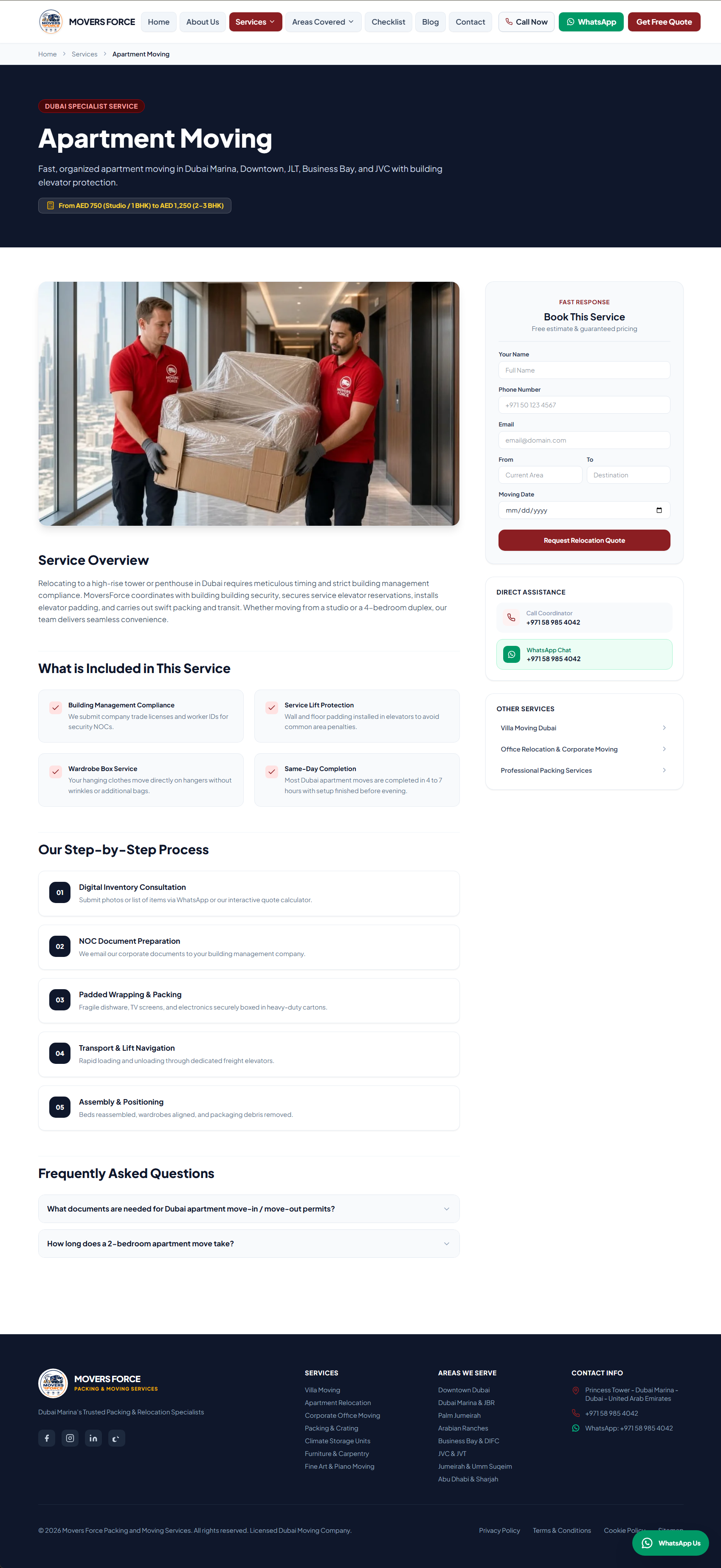

ReloMove / ProMovers — Complete Moving & Relocation Management System
✔ 100% White-Label: Change company name, tagline, logo, colors, phone, WhatsApp, email, address, and currency in under 2 minutes from the Admin Settings without touching a single line of code!
✔ Zero Extra Setup Needed: All production CSS & JavaScript assets are pre-compiled with Vite & Tailwind CSS v4, and all vendor dependencies are pre-installed. Upload and run!
✔ High Conversion Rate: Designed with conversion psychology, trust badges, instant quote modal, sticky WhatsApp button, promotional top bar, and discount exit-intent popups.
✔ Mobile-First & Ultra-Fast: Sub-second page load times with zero heavy icon font libraries—uses pure inline SVG Lucide icons.
================================================================================
2. PROGRAMMING LANGUAGES & TECHNOLOGIES USED
================================================================================
A. PROGRAMMING LANGUAGES:
- PHP 8.2 / 8.3 (Strict types, typed properties, match expressions, modern OOP)
- JavaScript (ES6+ modern syntax)
- HTML5 (Semantic HTML, Accessible ARIA standards, modern responsive markup)
- CSS3 (Modern CSS variables, Flexbox, CSS Grid, animations)
- SQL (MySQL / MariaDB relational database schema with foreign key cascades)
B. CORE FRAMEWORKS & LIBRARIES:
- Backend: Laravel 12.x (World's #1 PHP Framework — Modular MVC, Eloquent ORM, Blade Engine)
- Frontend Styling: Tailwind CSS v4 (Lightning-fast JIT engine, modern utility-first CSS)
- Interactivity: Alpine.js 3.14+ (Lightweight reactive state management, zero virtual DOM overhead)
- Asset Bundler: Vite 7.x (Next-generation lightning-fast frontend tooling & asset compilation)
- Icons: Custom Lucide Vector SVG Engine (Pure inline SVGs, zero runtime font bloat)
- Database: MySQL 8.0+ / MariaDB 10.6+ (Normalized schema, indexes, JSON columns)
- Structured Data: Schema.org JSON-LD (LocalBusiness, MovingCompany, Service, FAQPage, Article)
================================================================================
3. COMPLETE FEATURE BREAKDOWN
================================================================================
[ FRONTEND & CUSTOMER EXPERIENCE ]
1. Modern High-Conversion Homepage:
- Dynamic Hero Banner with headline, subheadline, trust badges, and direct CTA buttons.
- Interactive Quick Quote Estimator modal directly embedded in the hero.
- Dynamic Stats Counter (Completed Moves, Client Satisfaction, Professional Crew, Fleet Size).
- Core Services Showcase with high-resolution imagery and direct service links.
- "Why Choose Us" 6-pillar credibility grid (Licensed & Insured, Transparent Pricing, GPS Tracking, etc.).
- Moving Process / Step-by-Step Workflow (Survey -> Packing -> Transport -> Unpacking).
- District & Service Areas Grid with neighborhood badges.
- Verified Customer Reviews Slider / Grid.
- Accordion FAQ section with instant expand/collapse.
- Pre-Footer Call to Action banner with instant WhatsApp & Call triggers.
2. Multi-Step Instant Moving Quote Calculator (/get-a-quote):
- Step 1: Move Details (Moving From, Moving To, Relocation Date).
- Step 2: Property Type & Size (Studio, 1-6+ Bedroom Villa, Commercial Office, Warehouses).
- Step 3: Logistics Specifics (Elevator availability at pickup & dropoff, Floor numbers).
- Step 4: Add-On Services (Full Packing, Fragile Items Packing, Storage, Handyman/Assembly).
- Step 5: Multi-File Photo Upload (Customers can upload photos of heavy items/rooms for instant appraisal).
- Step 6: Contact Information (Name, Phone, WhatsApp, Email, Special Instructions).
- Unique Tracking Reference Generation (e.g., MF-2026-0001-A9F2).
- Instant Booking Confirmation Screen with printable/downloadable move summary.
3. Comprehensive Services CMS (/services & /services/{slug}):
- Pre-loaded with 10 industry-standard moving services:
* Villa Moving & Relocation
* Apartment & High-Rise Shifting
* Corporate Office & Commercial Moving
* Professional Packing & Crating Services
* Secure Climate-Controlled Storage
* Furniture Disassembly & Joinery Assembly
* Fine Art, Antiques & Luxury Goods Moving
* Upright & Grand Piano Relocation
* Inter-City & Inter-State Transportation
* International Freight & Customs Clearance
- Each service page features custom pricing tags, feature checklists, FAQs, and dedicated quote triggers.
4. District & Service Area Landing Pages (/areas & /areas/{slug}):
- Neighborhood-specific landing pages for hyper-local SEO ranking.
- Includes custom building gate pass, security NOC guidelines, and community regulations.
- Pre-loaded with top business districts, residential suburbs, and metropolitan zones.
5. Relocation Guide & Interactive Moving Checklist (/moving-checklist):
- Week-by-week interactive moving guide (4 Weeks Before, 2 Weeks Before, Moving Week, Moving Day).
- Interactive checkboxes allowing users to track their moving progress.
6. Company Blog & Knowledge Base (/blog & /blog/{slug}):
- Full-featured blog with categories, tags, author bio, read time estimation, and view counters.
- Optimized for organic inbound content marketing and customer acquisition.
7. Contact Us & Customer Inquiry Hub (/contact):
- Direct message inquiry form with anti-spam validation.
- Embedded interactive Google Map.
- Physical address, emergency support hotline, WhatsApp chat, and business hours.
8. Marketing & Conversion Boosters:
- Sticky WhatsApp Floating Action Button on all pages.
- Promotional Top Bar: Reconfigurable announcement banner with CTA button (toggle on/off).
- Promotional Exit/Delayed Popup: Customizable headline, promo text, discount offer, and timer delay.
- Cookie Consent Notice: GDPR compliant privacy banner.
- Google Places Review Integration: Connects to Google Places API with 24-hr caching and automatic database fallback ratings (4.9 / 5.0).
---
[ BACKEND & ADMINISTRATIVE CMS (/admin) ]
1. Executive Analytics Dashboard:
- Real-time KPI summary: Total Bookings, Active Leads, Monthly Revenue Forecast, New Contact Inquiries.
- Quick action shortcuts: Export Bookings, Manage Settings, Review Leads.
- Recent bookings feed with color-coded status badges.
2. Advanced Bookings & Leads Management (/admin/bookings):
- Filter leads by status: New, Contacted, Quote Sent, Confirmed, In Progress, Completed, Cancelled.
- Search by Reference Code, Customer Name, Phone, or Email.
- Detailed Lead View: Full inventory breakdown, uploaded customer photos, elevator details, addresses.
- Status Transition Workflow: Update booking progress with automated notifications.
- Financial Tracking: Assign quoted price, deposit paid, and balance due.
- Internal Operations Notes: Operations team can log timestamped surveyor notes and access instructions.
- One-Click CSV Export for spreadsheet analysis and CRM integration.
3. Visual Homepage Section Builder (/admin/sections):
- Full control over every section on the homepage without touching code.
- Reorder sections via sort order numbers.
- Toggle visibility on/off with 1-click switches.
- Edit titles, subtitles, badges, primary/secondary buttons, and background images.
4. Service & Area CMS (/admin/services & /admin/areas):
- Add, edit, or delete services and locations.
- Custom SEO titles, meta descriptions, focus keywords, and canonical URLs per page.
- Dynamic FAQ builder attached to each individual service/area.
5. Blog & Article Manager (/admin/blog):
- Create, edit, and publish moving tips and guides.
- Category and tag associations, featured image upload, and SEO metadata.
6. Customer Inquiries Inbox (/admin/messages):
- Dedicated inbox for messages submitted through the contact page.
- Mark as replied/pending, view details, one-click email reply, or direct WhatsApp reply.
7. Customer Testimonials & Reviews Manager (/admin/reviews):
- Add and moderate customer reviews, star ratings, photos, and verified badges.
8. Accordion FAQs Manager (/admin/faqs):
- Create categorized FAQs displayed on the homepage and quote pages.
9. Navigation Menu Builder (/admin/menus):
- Manage Header navigation links, Footer quick links, and legal menu items.
10. Media Asset Library (/admin/media):
- Upload images, banners, and documents with instant file URL copying.
11. SEO 301 & 302 Redirect Manager (/admin/redirects):
- Create URL redirect rules to prevent broken 404 links during migrations or URL restructuring.
12. User & Permission Management (/admin/users):
- Role-Based Access Control (RBAC): Super Admin, Operations Lead, Move Surveyor, Dispatcher.
- Create new administrative users, reset passwords, and assign permissions.
13. Complete White-Label System Settings (/admin/settings):
- Branding: Company Name, Tagline, Site Logo, White Logo, Favicon, Primary Brand Color (#8B1E22), Secondary Color (#0F172A), Accent Color (#DC2626). Theme colors update dynamically across the entire site via CSS variables!
- Contact Details: Primary Phone, Raw Phone, WhatsApp Number, Company Email, Billing/Secondary Email, Physical Address, Business Hours, Copyright Notice.
- Social Profiles: Facebook, Instagram, LinkedIn, TikTok, X (Twitter), YouTube.
- Google Places API: Connect live Google reviews using your API Key & Place ID, or enable database fallback mode.
- SEO & Tracking: Global Meta Title, Meta Description, OpenGraph Preview Image, Google Analytics 4 (GA4) ID, Google Tag Manager (GTM) ID, Meta (Facebook) Pixel ID.
- Promotional Banners & Popups: Enable/disable promo bars, change texts, button URLs, and modal delays.
- SMTP & Email Server: Configure SMTP Host, Port, Encryption (TLS/SSL), Username, Password, Sender Name, Sender Email, Admin Notification Recipient, and test the connection with a live "Send Test Email" button!
================================================================================
4. TECHNICAL REQUIREMENTS
================================================================================
Server Requirements:
- Operating System: Linux (Ubuntu, Debian, CentOS, AlmaLinux, CloudLinux) or Windows
- Web Server: Apache 2.4+ (with mod_rewrite) / Nginx / LiteSpeed
- PHP: Version 8.2 or 8.3
- Database: MySQL 8.0+ or MariaDB 10.6+
- Required PHP Extensions:
* BCMath
* Ctype
* cURL
* DOM
* Fileinfo
* JSON
* Mbstring
* OpenSSL
* PCRE
* PDO & PDO_MySQL
* Tokenizer
* XML
================================================================================
5. STEP-BY-STEP DEPLOYMENT & INSTALLATION GUIDE
================================================================================
METHOD A: CPANEL / SHARED HOSTING (RECOMMENDED FOR QUICK SETUP)
----------------------------------------------------------------
1. UPLOAD FILES:
- Log in to your cPanel -> Open "File Manager".
- Upload the clean project ZIP file into your hosting account (e.g., inside `public_html` or in a root directory like `/home/username/relomove`).
- Extract the ZIP archive.
- If extracted into a subfolder, point your domain's Document Root in cPanel (Domains -> Manage Domain) to the `public/` directory (e.g., `/home/username/relomove/public`).
- Alternatively, if your server strictly requires everything inside `public_html`:
* Move all folders EXCEPT `public` one level above `public_html`.
* Move the contents of `public/` directly into `public_html`.
* Update `index.php` paths accordingly.
2. CREATE DATABASE & IMPORT:
- Go to cPanel -> "MySQL Databases".
- Create a new database (e.g., `cpaneluser_movers`).
- Create a new database user and assign a strong password.
- Add the user to the database with "ALL PRIVILEGES".
- Open cPanel -> "phpMyAdmin".
- Select your new database, click the "Import" tab, choose `database/install.sql`, and click "Import / Go".
3. CONFIGURE .ENV:
- In File Manager, find `.env.production` (or `.env.example`).
- Copy or rename it to `.env`.
- Edit `.env` and update your database credentials and website URL:
APP_NAME="YourCompanyName"
APP_ENV=production
APP_DEBUG=false
APP_URL=https://yourdomain.com
DB_CONNECTION=mysql
DB_HOST=127.0.0.1
DB_PORT=3306
DB_DATABASE=cpaneluser_movers
DB_USERNAME=cpaneluser_dbuser
DB_PASSWORD=your_db_password
4. SET FILE PERMISSIONS:
- Ensure the following directories have write permissions (chmod 775 or 755):
* `storage/`
* `storage/framework/`
* `storage/logs/`
* `bootstrap/cache/`
5. CREATE STORAGE SYMLINK:
- In cPanel -> Terminal (or via SSH), run:
php artisan storage:link
- (If Terminal is not available in your cPanel, create a simple PHP script with `symlink('../storage/app/public', 'storage');` and run it once).
6. ALL DONE! Visit your website at `https://yourdomain.com`!
---
METHOD B: VPS / UBUNTU / CLOUD SERVER (NGINX / APACHE)
-------------------------------------------------------
1. Clone or extract the project to `/var/www/relomove`.
2. Set ownership and permissions:
sudo chown -R www-data:www-data /var/www/relomove
sudo chmod -R 775 /var/www/relomove/storage /var/www/relomove/bootstrap/cache
3. Configure your Nginx server block root to `/var/www/relomove/public`.
4. Copy `.env.example` to `.env` and run:
php artisan key:generate
php artisan storage:link
5. Import database:
mysql -u db_user -p db_name < database/install.sql
6. Restart web server:
sudo systemctl restart nginx (or php8.2-fpm)
---
METHOD C: LOCALHOST (XAMPP / LARAGON / PHP SERVER)
---------------------------------------------------
1. Extract into `htdocs/relomove` or `www/relomove`.
2. Create a database named `relomove` in `http://localhost/phpmyadmin`.
3. Import `database/install.sql`.
4. Copy `.env.example` to `.env` and set `DB_DATABASE=relomove`, `DB_USERNAME=root`, `DB_PASSWORD=`.
5. Open terminal in the project directory and run:
php artisan serve
6. Open your browser at `http://127.0.0.1:8000`.
================================================================================
6. DEFAULT ADMINISTRATIVE CREDENTIALS
================================================================================
Admin Login URL: https://yourdomain.com/admin/login (or http://127.0.0.1:8000/admin/login)
Default Email: admin@example.com
Default Password: Password@2026
Operations Dispatcher Account (Staff Level):
Login Email: dispatch@example.com
Default Password: Password@2026
> IMPORTANT SECURITY STEP:
After logging in for the first time, immediately navigate to:
Admin Dashboard -> Staff & Permissions -> Edit User -> Change Email and Password.
================================================================================
7. QUICK WHITE-LABEL & RE-BRANDING GUIDE (FOR BUYERS)
================================================================================
How to re-brand the website for your company in 3 easy steps:
STEP 1: UPDATE BRANDING & COLORS
- Go to `/admin/settings` -> "Branding" tab.
- Enter your Company Name (e.g., "Apex Logistics & Movers").
- Enter your Tagline.
- Upload your Company Logo (transparent PNG/SVG recommended) and Favicon.
- Pick your primary and secondary brand colors using the visual color picker. Click "Save Settings".
- Your new colors and branding will immediately reflect across the entire front-end!
STEP 2: UPDATE CONTACT & NOTIFICATIONS
- Go to `/admin/settings` -> "Contact" tab.
- Enter your phone numbers, WhatsApp chat number, physical office address, and business hours.
- Enter your Notification Email (where all new quotation leads will be delivered instantly).
STEP 3: CONNECT YOUR EMAIL (SMTP)
- Go to `/admin/settings` -> "Mail Settings" tab.
- Enter your SMTP credentials (from cPanel, Gmail, SendGrid, Mailgun, or Mailtrap).
- Click "Send Test Email" to verify that emails are sending cleanly.
Top Features You Will Love:
⭐ Instant Multi-Step Moving Quote Estimator with room/item photo uploads.
⭐ Live Lead Management CRM with reference code tracking and CSV exports.
⭐ Full White-Label Settings: Change company name, logo, phone, colors, and address in seconds.
⭐ Built-in SEO Superpowers: Automatic Schema.org JSON-LD tags, XML sitemap, and dynamic Meta tags for ranking #1 in local search.
⭐ Localized Community & Service CMS: Pre-loaded with 10 high-demand moving services and customizable neighborhood district landing pages.
⭐ WhatsApp Floating Chat & Marketing Popups: Convert browsing visitors into paying clients faster than ever.
⭐ Google Places Reviews integration with smart cache & fallback system.
⭐ Production Ready: Pre-compiled CSS & JS assets + full SQL database dump included.
What Is Included In The Package:
- Complete Laravel 12 Source Code
- Pre-compiled Production Assets (Vite / Tailwind CSS v4)
- Pre-installed Vendor Dependencies (Plug-and-play cPanel deployment)
- Complete Clean Demo MySQL Database Dump (install.sql)
- Comprehensive Step-by-Step Installation & User Guide
- Lifetime Free Updates & Clean Code Structure
================================================================================
Support & License:
Clean, unencrypted source code. Ready for commercial deployment.
================================================================================
Laravel 12.x
v1.0.0
45.14 MB
30 Days Included
Server Requirements: - Operating System: Linux (Ubuntu, Debian, CentOS, AlmaLinux, CloudLinux) or Windows - Web Server: Apache 2.4+ (with mod_rewrite) / Nginx / LiteSpeed - PHP: Version 8.2 or 8.3 - Database: MySQL 8.0+ or MariaDB 10.6+ - Required PHP Extensions: * BCMath * Ctype * cURL * DOM * Fileinfo * JSON * Mbstring * OpenSSL * PCRE * PDO & PDO_MySQL * Tokenizer * XML
No reviews yet for this product.
Sngine Vault License Terms
Welcome to Sngine Vault! These License Terms explain the rights and restrictions for digital items sold on our marketplace. By purchasing or selling on Sngine Vault, you agree to comply with the applicable terms listed below.
General Overview
Each product comes with either a Regular License or an Extended License. Licenses are non-exclusive, non-transferable, and apply to a single end product unless otherwise stated.
Software & Code
Grants use in one end product for yourself or a client that is not sold or monetised.
- Modify or customize the item.
- Use in personal or client projects.
- No resale or redistribution.
Allows use in one end product that is sold or monetized.
- Use in SaaS platforms, web apps, or software sold to end users.
- Unlimited users/customers for the single end product.
- Cannot resell or redistribute the source files.
Fonts
- Use in unlimited personal and commercial projects.
- Use in logos, print materials, social media graphics, and websites.
- Cannot embed in apps, eBooks, or web apps.
- Use in desktop software, mobile apps, games, and eBooks.
- Embed fonts in web or app UI for commercial products.
- Distribute fonts as part of a larger digital product (not standalone).
Audio
- Use in one end product (e.g., video, podcast, game).
- Can be used on YouTube, social media, or websites without monetization.
- No broadcast rights or resale usage.
- Use in TV, radio, streaming platforms, and commercials.
- Monetized use allowed (e.g., ads, paid courses, mobile games).
- Redistribution as part of a larger work is permitted.
Video
- Use in one project for personal or client use.
- Includes usage in YouTube videos, presentations, and websites.
- Not allowed in commercial templates or resale products.
- Use in monetized or commercial projects (e.g., ads, films).
- Incorporate into templates or end products for sale.
- Distribution to unlimited viewers/customers is allowed.
Images, Icons, Graphics
- Use in websites, blogs, social media, and client work.
- Can be modified and used in static designs.
- Not for use in templates, merchandise, or resold materials.
- Use in print-on-demand, merchandise, and commercial templates.
- Use in up to 250,000 physical or digital end products.
- Must not resell the original image as-is.
Common Terms for All Licenses
- No Ownership: You may not claim ownership of any item, even after modifications.
- No Redistribution: You cannot share, resell, or sublicense items in their original or modified form.
- Single Use: A license applies to a single end product. For multiple projects, purchase additional licenses.
- Team Use: Items may only be shared within your team or organization, not externally.
- Attribution: May be required if the author specifies it in the item description.
For Sellers
- • You must specify which license types apply to your item.
- • You confirm you own or have rights to sell every asset included in your product.
- • You agree to provide reasonable clarification of license usage if asked by buyers.
License Violations
Violations of these terms may result in:
- • Account suspension or permanent ban.
- • Loss of access to purchased items.
- • Legal action from Sngine Vault or the original creator.
Need Help?
If you are unsure which license you need or want to report a violation, contact us: