Spider Trading Bot – Advanced Multi-Strategy Crypto Trading Platform
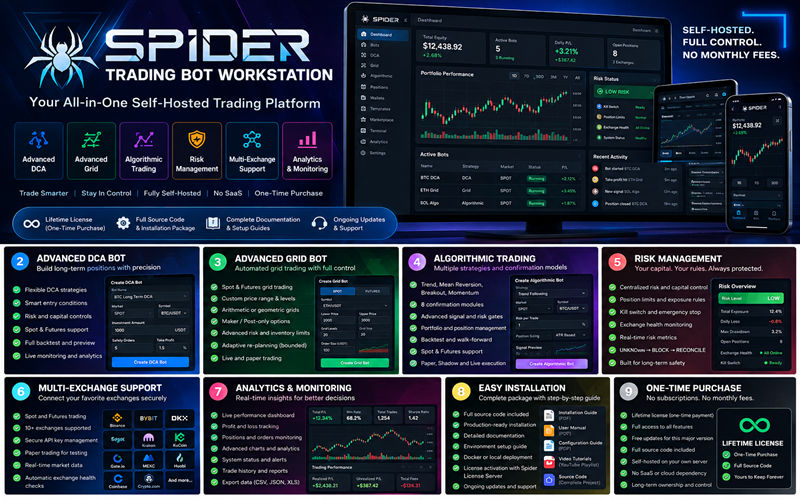
Spider DCA Bot is a professional self-hosted cryptocurrency trading automation platform built for traders who want advanced strategy automation, multi-exchange connectivity, centralized risk management, secure execution controls, AI-assisted analysis, real-time monitoring, alerts, and operational control from one trading workstation.
The platform has evolved beyond a traditional DCA bot into a broader **multi-strategy crypto trading system** supporting advanced DCA, Grid, Algorithmic, Dip Analyzer, and Quantitative trading workflows.
Spider DCA Bot is designed for serious trading environments where strategy configuration, execution, capital management, security, risk controls, monitoring, recovery, and exchange connectivity must work together without bypassing safety controls.
---
Multi-Strategy Trading Platform
Spider DCA Bot provides multiple specialized trading strategy engines within one self-hosted platform.
Supported strategy families include:
- Advanced DCA Trading
- Grid Trading
- Algorithmic Trading
- Dip Analyzer Trading
- Quantitative Trading
- PAPER and controlled LIVE trading workflows
- Multi-exchange execution infrastructure
- Centralized portfolio and risk controls
- AI-assisted analysis and filtering
- Operational monitoring and alerts
Each strategy operates within the platform's central security, risk, capital, exchange-health, and execution safeguards.
---
Advanced DCA Trading
Create and manage highly configurable DCA trading bots with detailed control over strategy behavior, capital allocation, entries, safety orders, exits, risk limits, and market conditions.
Advanced DCA configuration includes areas such as:
- Strategy and risk envelopes
- Market and price-range configuration
- Capital allocation
- Capital reserve controls
- Compounding rules
- Entry logic
- Technical entry triggers
- Safety-order ladders
- Safety-order spacing
- Order sizing
- Take-profit configuration
- Exit controls
- Trailing logic
- Optional signal filters
- Maximum order notional
- Daily-loss limits
- Drawdown controls
- Exposure limits
- Emergency stop behavior
The DCA engine is designed to separate strategy configuration from execution authority so trading actions remain subject to the platform's risk and security controls.
---
Advanced Grid Trading
Spider DCA Bot includes an advanced Grid trading engine for building structured grid-based cryptocurrency strategies.
Grid capabilities are designed around controlled market ranges, capital allocation, order planning, profit realization, and risk-aware re-planning.
Grid functionality includes areas such as:
- Grid range configuration
- Price-level planning
- Grid spacing controls
- Capital allocation
- Entry and exit planning
- Realized-profit tracking
- Profit compounding
- Quote-asset accumulation
- Base-asset accumulation
- Mixed accumulation modes where applicable
- Deterministic adaptive re-planning
- Strategy revision controls
- Order-state monitoring
- Exchange precision and notional validation
- Risk and capital checks
- Recovery-aware execution
Adaptive Grid changes are designed to remain bounded and controlled instead of continuously changing strategy behavior without oversight.
Grid execution remains subject to centralized risk, exchange health, capital availability, order state, and recovery controls.
---
Algorithmic Trading
Spider DCA Bot includes an Algorithmic trading strategy framework for users who want rules-based automated trading beyond traditional DCA and Grid strategies.
Algorithmic trading workflows are designed around structured strategy configuration, signal evaluation, execution authorization, risk enforcement, and operational monitoring.
Algorithmic capabilities include areas such as:
- Strategy-rule configuration
- Market-condition evaluation
- Signal processing
- Entry and exit logic
- Risk-controlled execution
- Position monitoring
- Order lifecycle management
- Strategy state tracking
- Runtime safety controls
- PAPER trading workflows
- Controlled LIVE execution where authorized
- Audit and activity evidence
Algorithmic strategies do not bypass the platform's central risk controls, capital limits, exchange-health checks, or emergency safeguards.
---
Dip Analyzer Strategy
Spider DCA Bot includes a specialized Dip Analyzer strategy for identifying, evaluating, and managing potential cryptocurrency market-dip opportunities.
The Dip Analyzer is designed to combine market evidence, configurable rules, risk controls, and operational safeguards before any eligible trading workflow proceeds.
Dip Analyzer functionality includes areas such as:
- Market dip detection
- Dip-condition analysis
- Entry qualification
- Market evidence evaluation
- News and event evidence
- Strategy scoring
- Configurable risk rules
- Capital limits
- Emergency posture controls
- Market-mode awareness
- Protective execution behavior
- Position and order-state monitoring
- Historical evidence
- Strategy configuration ownership
- Audit and operational evidence
The Dip Analyzer does not treat every market decline as a trading opportunity. Strategy conditions and risk requirements must be satisfied before eligible actions proceed.
---
Quantitative Trading
Spider DCA Bot includes a Quantitative trading framework designed for systematic and data-driven trading workflows.
Quantitative strategies are structured around research, models, planning, execution authorization, historical evidence, risk management, and controlled deployment.
Quantitative capabilities include areas such as:
- Quantitative strategy configuration
- Research and model lineage
- Historical evidence
- Strategy planning
- Market analysis
- Signal evaluation
- Position and exposure controls
- Capital coordination
- Order intent management
- Fill-derived position tracking
- PnL tracking
- Fee and slippage monitoring
- Transaction-lag monitoring
- Trade-velocity controls
- Partial-fill handling
- Cancellation controls
- Startup recovery
- Controlled LIVE authorization where eligible
- Audit and execution evidence
Quantitative execution is designed to remain traceable from research and strategy configuration through planning and execution.
---
AI-Assisted Trading Intelligence
Spider DCA Bot includes configurable AI-provider support for advisory, filtering, classification, explanation, and trading-related analysis.
AI functionality is designed to support strategy workflows rather than act as an unrestricted execution authority.
AI can assist with areas such as:
- Market interpretation
- Signal filtering
- Strategy classification
- Trading explanations
- Decision support
- Context analysis
- Research assistance
- Strategy-related advisory workflows
AI cannot bypass:
- Position limits
- Capital controls
- Stop-loss rules
- Drawdown limits
- Kill-switch controls
- Exchange-health requirements
- Order-state safeguards
- Recovery requirements
- Central risk controls
AI-provider credentials are stored and managed through protected backend-controlled settings and are not intended to be exposed in the browser after secure configuration.
---
Multi-Exchange Crypto Trading
Spider DCA Bot supports multi-exchange connectivity and can manage connections for up to 8 supported cryptocurrency exchanges.
The platform includes supported exchange-integration workflows such as Binance and Bybit, with additional supported exchange adapters depending on the installed release and configured environment.
Multi-exchange functionality includes:
- Exchange connection management
- API credential configuration
- Connection health checks
- Exchange capability checks
- Trading-environment identification
- Exchange-specific precision handling
- Order validation
- Trading permission verification
- Exchange health monitoring
- Market availability checks
- Centralized connection management
Exchange credentials should use only the permissions required for trading.
Withdrawal permissions should remain disabled.
Spider DCA Bot does not require unrestricted exchange-account access for normal trading operations.
---
Centralized Risk Management
Risk management is a core part of the Spider DCA Bot architecture.
The platform is designed so that trading strategies do not independently bypass centralized risk enforcement.
Risk controls can include:
- Maximum order limits
- Position limits
- Strategy exposure limits
- Capital limits
- Daily-loss limits
- Drawdown limits
- Reserve requirements
- Exchange-health checks
- Trading-mode controls
- Strategy authorization
- LIVE trading authorization
- Kill-switch enforcement
- Emergency stop controls
- Execution-state validation
- Protective action handling
Trading strategies remain subject to the platform's central safety and risk authority.
---
Secure Exchange Credential Management
Security is built into the platform rather than treated as an optional feature.
Spider DCA Bot includes:
- Backend-managed exchange credentials
- Encrypted credential storage
- Protected API-key handling
- MFA-protected sensitive actions
- Owner security controls
- Session monitoring
- Security-event recording
- Audit-event recording
- Protected LIVE trading actions
- Credential-health monitoring
- Emergency account controls
- Kill-switch enforcement
- Recovery controls
Sensitive API secrets are not intended to be rendered back into the browser after secure storage.
---
PAPER and Controlled LIVE Trading
Spider DCA Bot separates testing workflows from real-money execution.
Depending on the strategy and configured environment, traders can use PAPER, simulation, demo/testnet, and controlled LIVE workflows.
Before LIVE trading is enabled, the platform can require verification of areas such as:
- Active Spider license
- Owner authentication
- MFA protection
- Exchange connectivity
- Exchange environment
- Exchange health
- Risk configuration
- Capital availability
- Kill-switch readiness
- Strategy authorization
- LIVE trading authorization
- System health
- Execution environment
- Operational safety gates
LIVE trading should only be enabled after all applicable safety requirements have been reviewed and verified.
---
Safe Order Execution
Spider DCA Bot is designed to treat uncertain exchange outcomes carefully.
If an order submission produces an uncertain result, the platform is designed to avoid blindly submitting the same trade again.
Uncertain execution states can be blocked and routed through reconciliation before retry or further execution.
This helps reduce the risk of duplicate orders caused by network failures, exchange timeouts, interrupted requests, or uncertain execution responses.
The operational principle is:
**UNKNOWN → BLOCK → RECONCILE**
rather than blindly retrying potentially executed orders.
---
# DCA Command Center
The DCA Command Center provides centralized operational control over DCA bots and related trading activity.
The interface can provide visibility into:
- Active bots
- Bot lifecycle state
- DCA state
- Capital usage
- Runtime health
- Trading status
- Exchange connectivity
- Strategy state
- Position information
- Start controls
- Pause controls
- Stop controls
- Emergency kill switch
This gives the operator one centralized location for managing active DCA trading workflows.
---
Bot Engine and Strategy Operations
Spider DCA Bot includes centralized bot-engine and strategy-management workflows for controlling multiple trading systems.
Operational areas can include:
- Bot lifecycle control
- Strategy state
- Worker health
- Runtime monitoring
- Execution readiness
- Trading authorization
- Exchange connectivity
- Risk status
- Capital status
- Strategy maturity
- Execution evidence
- Emergency controls
The platform is designed to preserve separation between strategy logic and execution authority.
---
Telegram Alerts and Notifications
Spider DCA Bot includes operational alerting and notification systems for important trading, security, and system activity.
Available notification areas can include:
- Telegram alerts
- In-app notifications
- Email notification configuration
- WhatsApp notification configuration
- Alert routing
- Notification preferences
- Delivery monitoring
- Trading events
- Risk events
- Security events
- System events
- Bot lifecycle events
Notification-channel availability depends on the services configured by the owner.
---
Alert Center
The platform includes centralized alert-management capabilities for operational and security events.
Alert workflows can include:
- Alert creation
- Alert acknowledgment
- Alert resolution
- Alert filtering
- Severity classification
- Alert routing
- Delivery tracking
- Evidence generation
- Risk-event monitoring
- Operational-event monitoring
This helps provide centralized visibility into trading and system conditions that may require attention.
---
Security Center
Spider DCA Bot includes an owner-focused Security Center for protecting the trading workstation.
Security capabilities include:
- Multi-factor authentication
- Session management
- Recovery controls
- Recovery codes
- Protected actions
- Credential safety monitoring
- Alert-channel security
- Security events
- Audit events
- Sensitive-action monitoring
- Emergency account controls
- Device/session visibility
- Security evidence
Security-sensitive operations can require stronger authentication and additional verification before they are allowed.
---
Emergency Kill Switch
Spider DCA Bot includes centralized emergency controls for rapidly stopping or blocking trading activity when necessary.
The kill-switch system is designed to provide an independent safety layer outside individual strategy logic.
This means a strategy cannot simply ignore a central emergency stop decision.
---
# Recovery and Reconciliation
Automated trading systems must be able to recover safely from restarts, network interruptions, exchange outages, uncertain orders, and interrupted execution workflows.
Spider DCA Bot includes recovery-oriented workflows designed around:
- Order-state reconciliation
- Startup recovery
- Exchange-state verification
- Position-state verification
- Execution-state recovery
- Unknown-order handling
- Duplicate-order prevention
- Operational evidence
- Manual repair workflows where appropriate
Recovery safety takes priority over blindly resuming execution after an uncertain state.
---
Audit and Operational Evidence
Important platform actions can generate audit, security, or operational evidence.
Evidence can include areas such as:
- Authentication events
- Security actions
- Trading actions
- Bot lifecycle changes
- Configuration changes
- Risk decisions
- Exchange activity
- Sensitive administrative actions
- Alert events
- Execution outcomes
This provides better traceability for operating and troubleshooting the platform.
---
Self-Hosted Deployment
Spider DCA Bot is designed for self-hosted deployment.
This gives the owner control over:
- Application hosting
- Server environment
- Database
- Exchange credentials
- Trading infrastructure
- Security configuration
- AI-provider configuration
- Notification integrations
- Backup procedures
- Deployment environment
A compatible VPS or server environment is required.
Self-hosting also means the owner remains responsible for properly securing the server, operating system, domain, HTTPS configuration, credentials, backups, and infrastructure.
---
Licensing
Spider DCA Bot uses software licensing to control authorized installations and feature access.
Depending on the purchased license, licensing can govern:
- Software activation
- Installation authorization
- Trading features
- Bot execution
- Exchange-management capabilities
- Risk functionality
- Strategy availability
- Advanced functionality
License restrictions depend on the purchased product package.
---
# Technology Stack
Spider DCA Bot is built using a modern multi-service technology architecture.
Core technologies include:
- Next.js
- React
- TypeScript
- NestJS
- PostgreSQL
- Go
- Rust
The architecture separates:
- User interface
- Backend authority
- Database persistence
- Strategy processing
- Trading operations
- Execution services
- Risk controls
- Specialized high-performance components
The browser does not need direct access to exchange secrets or backend trading infrastructure.
---
Recommended For
Spider DCA Bot is designed for users interested in:
- DCA crypto trading
- Advanced DCA strategies
- Grid trading
- Automated Grid strategies
- Algorithmic crypto trading
- Quantitative trading
- Systematic trading
- Crypto dip analysis
- Automated cryptocurrency trading
- Multi-strategy trading
- Multi-exchange trading
- Crypto trading automation
- Trading-bot infrastructure
- Binance trading automation
- Bybit trading automation
- Exchange API integration
- Crypto risk management
- AI-assisted trading analysis
- Trading alerts and monitoring
- Self-hosted cryptocurrency trading software
- Advanced crypto trading systems
---
Key Platform Highlights
Spider DCA Bot combines multiple areas that are normally managed separately:
- Advanced DCA trading
- Grid trading
- Algorithmic trading
- Dip Analyzer strategies
- Quantitative trading
- Multi-exchange connectivity
- Central risk management
- Exchange health monitoring
- AI-provider integration
- Telegram alerts
- Notification management
- Security Center
- MFA protection
- Emergency kill switch
- Recovery and reconciliation
- Audit evidence
- PAPER and controlled LIVE workflows
- Self-hosted deployment
The objective is to provide one operational environment for configuring, monitoring, securing, and managing multiple cryptocurrency trading strategies.
---
Important Exchange Security Recommendation
When connecting an exchange account, enable only the permissions genuinely required for trading.
**Keep withdrawal permissions disabled.**
Never publicly share or expose:
- Exchange API secrets
- Passwords
- MFA secrets
- Recovery codes
- Private keys
- Database credentials
- Server credentials
- Encryption keys
- AI-provider API secrets
- Environment variables
API credentials should be treated as production secrets.
---
Important LIVE Trading Recommendation
Do not move directly from software installation to significant real-money trading.
A safer progression is:
1. Install and verify the platform.
2. Activate the appropriate Spider license.
3. Secure the owner account with MFA.
4. Configure exchange credentials with trading permissions only.
5. Test exchange connectivity.
6. Verify exchange health.
7. Configure strict risk limits.
8. Verify the emergency kill switch.
9. Test strategies in PAPER/demo environments where supported.
10. Review strategy configuration.
11. Verify LIVE authorization and safety gates.
12. Begin only with a very small, closely monitored real-money test when appropriate.
13. Review orders, fills, alerts, logs, and operational health before increasing exposure.
---
Risk Disclosure
Cryptocurrency trading involves significant financial risk and can result in partial or complete loss of trading capital.
Spider DCA Bot does not guarantee:
- Profits
- Returns
- Winning trades
- Positive investment performance
- Successful market predictions
- Protection from market losses
Automated trading does not remove financial risk.
Historical performance, simulations, backtests, PAPER trading results, AI-generated analysis, quantitative models, or previous trading outcomes do not guarantee future performance.
Spider DCA Bot is a trading automation and operational software platform.
The user remains responsible for:
- Strategy configuration
- Trading decisions
- Capital allocation
- Exchange settings
- API permissions
- Risk limits
- Live-trading authorization
- Server security
- Software configuration
- Monitoring
- Regulatory obligations
- Compliance with applicable laws
- Compliance with exchange terms and requirements
Next.js, React, TypeScript, NestJS, PostgreSQL, Go, Rust
v1.1.0
35.57 MB
30 Days Included
Standard PHP 8.2+ and Web Server environment.
No reviews yet for this product.
Sngine Vault License Terms
Welcome to Sngine Vault! These License Terms explain the rights and restrictions for digital items sold on our marketplace. By purchasing or selling on Sngine Vault, you agree to comply with the applicable terms listed below.
General Overview
Each product comes with either a Regular License or an Extended License. Licenses are non-exclusive, non-transferable, and apply to a single end product unless otherwise stated.
Software & Code
Grants use in one end product for yourself or a client that is not sold or monetised.
- Modify or customize the item.
- Use in personal or client projects.
- No resale or redistribution.
Allows use in one end product that is sold or monetized.
- Use in SaaS platforms, web apps, or software sold to end users.
- Unlimited users/customers for the single end product.
- Cannot resell or redistribute the source files.
Fonts
- Use in unlimited personal and commercial projects.
- Use in logos, print materials, social media graphics, and websites.
- Cannot embed in apps, eBooks, or web apps.
- Use in desktop software, mobile apps, games, and eBooks.
- Embed fonts in web or app UI for commercial products.
- Distribute fonts as part of a larger digital product (not standalone).
Audio
- Use in one end product (e.g., video, podcast, game).
- Can be used on YouTube, social media, or websites without monetization.
- No broadcast rights or resale usage.
- Use in TV, radio, streaming platforms, and commercials.
- Monetized use allowed (e.g., ads, paid courses, mobile games).
- Redistribution as part of a larger work is permitted.
Video
- Use in one project for personal or client use.
- Includes usage in YouTube videos, presentations, and websites.
- Not allowed in commercial templates or resale products.
- Use in monetized or commercial projects (e.g., ads, films).
- Incorporate into templates or end products for sale.
- Distribution to unlimited viewers/customers is allowed.
Images, Icons, Graphics
- Use in websites, blogs, social media, and client work.
- Can be modified and used in static designs.
- Not for use in templates, merchandise, or resold materials.
- Use in print-on-demand, merchandise, and commercial templates.
- Use in up to 250,000 physical or digital end products.
- Must not resell the original image as-is.
Common Terms for All Licenses
- No Ownership: You may not claim ownership of any item, even after modifications.
- No Redistribution: You cannot share, resell, or sublicense items in their original or modified form.
- Single Use: A license applies to a single end product. For multiple projects, purchase additional licenses.
- Team Use: Items may only be shared within your team or organization, not externally.
- Attribution: May be required if the author specifies it in the item description.
For Sellers
- • You must specify which license types apply to your item.
- • You confirm you own or have rights to sell every asset included in your product.
- • You agree to provide reasonable clarification of license usage if asked by buyers.
License Violations
Violations of these terms may result in:
- • Account suspension or permanent ban.
- • Loss of access to purchased items.
- • Legal action from Sngine Vault or the original creator.
Need Help?
If you are unsure which license you need or want to report a violation, contact us: